Storeify vs StoreLocators: 2026 Pricing and Comparison
Shopify store locator app with dealer submissions and product association
S: Store Locator by Storeify is one of the better-built cheap Shopify locators in this comparison: a Built for Shopify badge, 4.9 across 204 reviews, and a dealer submission form, per-day hours and product association at $8.99 a month for a hundred locations. This page covers what that price buys, and how its locator pages look to a search engine, which is better on the per-location pages than on the main list.
Last reviewed
The short answer
Storeify is a strong, cheap Shopify locator and its dealer submission form is better than most things at this price. We are the better buy when the store list belongs to retailers rather than to you, when shoppers need real availability, or when you would rather not run a Google Maps billing account of your own.
What each product is designed to do, in its own terms. A capability named on one side is not a claim that the other lacks it, and neither column ranks the two: the table below is where they are compared row by row.
What Storeify is built for
You are on Shopify and the store list is yours to maintain
Recruiting dealers through a submission form is the workflow you need
Attaching specific products or variants to specific stores is enough
A hundred locations for $8.99 a month is the deciding factor
Running your own Google Maps key and billing account is not a problem
If the locator is meant to earn search traffic, give each location a URL key so it gets a detail page, and check how those pages are linked, since the main list renders in the browser.
What StoreLocators is built for
Retailers you do not control hold the store list
Shoppers need per-product, per-variant, per-store availability rather than a manual association
The locator pages have to be indexable, not just present
Retailers that start stocking you should appear without a submission or an approval
You would rather the map came with the subscription than with a Google invoice
StoreLocators and Storeify, side by side
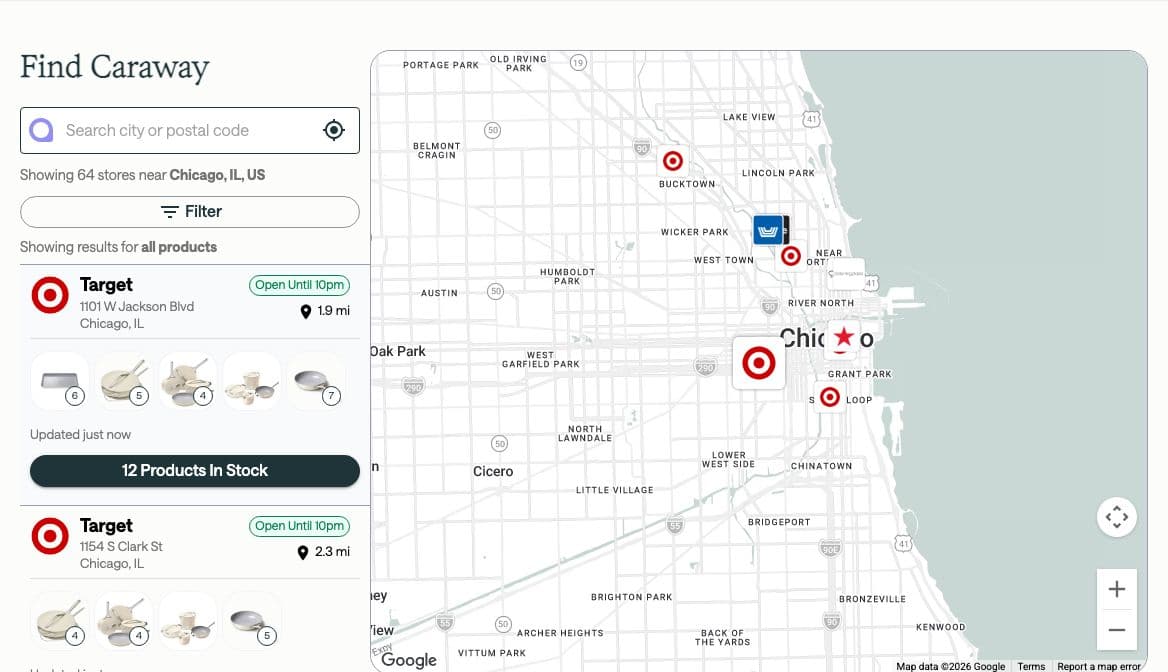
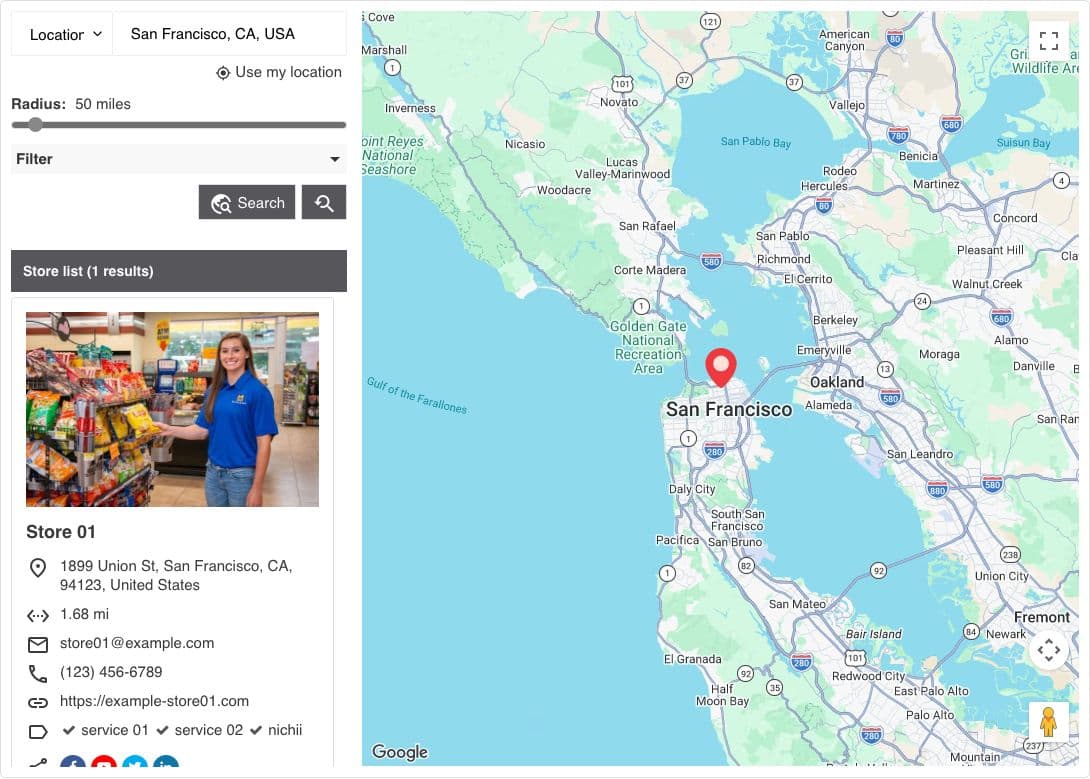
Both store locators as a shopper sees them, captured the same way: a 1280 by 800 browser window placed in Chicago, searching for Chicago. A demo holds whatever sample data its vendor chose, so where that changes what the picture shows, the caption says so. Each shot is trimmed to a common shape here; select one to see all of it.
StoreLocatorsCaptured October 15, 2026 from a live customer site, searching “Chicago, IL”.
StoreLocators · Captured October 15, 2026 from a live customer site, searching “Chicago, IL”.
StoreifyCaptured October 15, 2026 from the vendor’s own demo, searching “San Francisco, CA”.Searched San Francisco because Storeify's demo holds no Chicago stores. The demo ships one sample store.
Storeify · Captured October 15, 2026 from the vendor’s own demo, searching “San Francisco, CA”. Searched San Francisco because Storeify's demo holds no Chicago stores. The demo ships one sample store.
Pricing, side by side
Not close on price, and there is no point pretending otherwise. Storeify covers a thousand locations for $19.99 a month. Our equivalent tier is $195.
What separates them is what the money buys. Storeify prices an app that displays locations you supply and approve. Ours prices retailer availability data for locations you do not own, refreshed daily, with the map included. On an owned store list that is a lot of money for something not being used.
StoreLocators
Prices published
Three tiers on our Shopify App Store listing, scaling by retail locations: Launch up to 2,000 locations, Grow from 2,000 to 10,000, and Scale above 10,000, at $195, $395 and $995 per month.
Month to month, no long-term contract and no termination fee
Refund available within 30 days of the latest charge
Map included; shopper sessions and map loads are not metered
Free trial documented. A 14-day free trial on every tier.
Sources,
Storeify
Prices published
Tiers by location count: Free at 1 location, Startup at $8.99 a month to 100, Pro at $19.99 to 1,000 and Advanced at $39.99 to 5,000 on the Shopify listing, with Platinum at $69.99 to 10,000 and Unlimited at $89.99 in Storeify’s pricing guide. Billed monthly in USD through Shopify, with a 14-day free trial on every paid plan.
Monthly only; no annual billing or annual discount is offered
Caps are hard, with no overage rate; the docs say you may need to reduce locations before downgrading
Customer supplies their own Google Maps API key with billing enabled on their own Google Cloud project
No Storeify terms page exists, so cancellation and refunds follow Shopify app billing
All charges billed in USD
Free trial documented. A 14-day free trial on all paid plans, plus a permanent free plan limited to one location.
Sources,,,
StoreLocators vs Storeify at a glance
Sixteen rows on one review date. Storeify documents itself more thoroughly than most vendors at this price, so few cells here are unknown; the ones that are unpublished are unpublished because no vendor terms page exists.
Source 1S: Store Locator on the Shopify App StoreShopify App Store. Reviewed 2026-10-15.Full citationSource 2S: Store Locator reviews on the Shopify App StoreShopify App Store. Reviewed 2026-10-15.Full citationSource 3S: Store Locator rating and review countShopify App Store. Reviewed 2026-10-15.Full citationSource 4Storeify: product sitestoreify.app. Reviewed 2026-10-15.Full citationSource 5Storeify docs: building a store locator pagesl-guide.storeify.app. Reviewed 2026-10-15.Full citationSource 6Storeify docs: installing the appsl-guide.storeify.app. Reviewed 2026-10-15.Full citationSource 7Storeify docs: frequently asked questionssl-guide.storeify.app. Reviewed 2026-10-15.Full citationSource 8Storeify docs: dealer formsl-guide.storeify.app. Reviewed 2026-10-15.Full citationSource 9Storeify docs: creating the details pagesl-guide.storeify.app. Reviewed 2026-10-15.Full citationSource 10Storeify docs: analyticssl-guide.storeify.app. Reviewed 2026-10-15.Full citationSource 11Storeify docs: showing a location list for a citysl-guide.storeify.app. Reviewed 2026-10-15.Full citationSource 12Storeify docs: theme setupsl-guide.storeify.app. Reviewed 2026-10-15.Full citationSource 13Storeify docs: feature overviewsl-guide.storeify.app. Reviewed 2026-10-15.Full citationSource 14Storeify docs: upgrading and downgradingsl-guide.storeify.app. Reviewed 2026-10-15.Full citationSource 15Storeify on the Shopify App Store partner directoryShopify App Store. Reviewed 2026-10-15.Full citationSource 16Storeify docs: pricing planssl-guide.storeify.app. Reviewed 2026-10-15.Full citationSource 17Storeify docs: import and sync from Google Sheetssl-guide.storeify.app. Reviewed 2026-10-15.Full citationSource 18Storeify docs: custom fieldssl-guide.storeify.app. Reviewed 2026-10-15.Full citationSource 19Storeify demo store: a location detail pagestoreify-demo.myshopify.com. Reviewed 2026-10-15.Full citationSource 20StoreLocators: guarantee, refunds and cancellationstorelocators.com. Reviewed 2026-10-15.Open the sourceFull citationSource 21StoreLocators on the Shopify App StoreShopify App Store. Reviewed 2026-10-15.Open the sourceFull citationSource 22StoreLocators: free retailer store listsstorelocators.com. Reviewed 2026-10-15.Open the sourceFull citation
–Not published by the vendorStoreify: Contract termsNo vendor terms page.Storeify’s own terms URL returns 404, so contract length, cancellation and refunds are whatever Shopify’s app billing provides rather than anything Storeify publishes. Charges are billed in USD through Shopify and follow the store’s billing cycle.Sources1. S: Store Locator on the Shopify App Store14. Storeify docs: upgrading and downgrading
Pricing
$195–$995 per monthStoreLocators: PricingThree tiers on our Shopify App Store listing, scaling by retail locations: Launch up to 2,000, Grow from 2,000 to 10,000, Scale above 10,000.Source21. StoreLocators on the Shopify App Store
Free–$89.99 per monthStoreify: PricingMonthly only; no annual option or annual discount appears anywhere. The Shopify listing tops out at $39.99 for 5,000 locations, and the pricing guide adds Platinum at $69.99 and Unlimited at $89.99.Sources1. S: Store Locator on the Shopify App Store16. Storeify docs: pricing plans
Merchant ratingSame storefront, so these compare. Read with the count.
Yes14-day trial, plus a one-location free planStoreify: Evaluate without a sales callThe trial covers every paid plan. The free plan is "Free forever" but capped at a single location, which is enough to see the app work and not enough to evaluate it on a real list.Sources1. S: Store Locator on the Shopify App Store16. Storeify docs: pricing plans
Retailer coverage
Adding a retailer you sell throughThe gap between the retailer list you are sold and the one you actually sell through.
On request, typically within days, at no additional cost
You add it, or approve a dealer submissionStoreify: Adding a retailer you sell throughA dealer can submit themselves through the form, but the location does not appear until an admin opens the submission and clicks Add to location list. Nothing is discovered automatically.Source8. Storeify docs: dealer form
Retailer coverageCoverage only counts where you actually sell.
–Not published by the vendorStoreify: Retailer coverageNo retailer network.Storeify supplies no store data and publishes no coverage figure. Its "15,000+ Active Stores" line counts merchants using the app, not locations available to you.Source4. Storeify: product site
Location capA cap you can grow past is a repricing event, not a feature.
Priced by retail locations, not cappedStoreLocators: Location capPlans scale by location count rather than cutting the map off at a number.
1 free, then 100, 1,000, 5,000, 10,000, unlimitedStoreify: Location capThe Shopify listing shows four plans up to 5,000 locations; Storeify’s pricing guide adds Platinum at 10,000 and Unlimited. Hard caps rather than overages: going from 100 to 101 locations moves the bill from $8.99 to $19.99, and the docs say you may need to reduce locations before downgrading to a lower cap.Sources1. S: Store Locator on the Shopify App Store16. Storeify docs: pricing plans14. Storeify docs: upgrading and downgrading
Data and freshness
Where the store data comes fromThe whole difference. Everything else follows.
Automatic discovery across 205 integrated retailer feedsStoreLocators: Where the store data comes fromNo spreadsheet to maintain. Retailers that stock you are found in their own feeds and appear without you entering them.
Locations you enter, import, or sync from a Google SheetStoreify: Where the store data comes fromManual entry, an Excel sample-file import, and a Google Sheets import on Startup and above, which becomes an automatic sync on Pro and above. Every row is still one you supply; no retailer feed or other connector is documented.Sources5. Storeify docs: building a store locator page17. Storeify docs: import and sync from Google Sheets
Refresh cadenceA locator that sends a shopper to a store that dropped the line costs more trust than it wins.
Retailer feeds, refreshed daily
On edit or import, or minutes after a sheet edit on ProStoreify: Refresh cadenceWith automatic sync on (Pro and above), Google notifies the app when the connected sheet changes and changed rows are applied about three minutes after the last edit. On Startup the sheet import is run by hand. The map is as current as the sheet or the file.Source17. Storeify docs: import and sync from Google Sheets
Product-level availabilityWhether the map answers "who has this product" or only "where are the shops".
YesPer product, per variant, per store, filtered to in-stockStoreLocators: Product-level availabilityRetailer-reported rather than a live poll of a physical shelf, which is the honest description of what this category actually has.
Products attached by hand, down to the variantStoreify: Product-level availabilityYou can associate specific products, or specific variants of a product, with a location, and shoppers can filter on that. It is a manual association you maintain rather than a stock feed: no inventory sync is documented, and no freshness claim is made for it.Source9. Storeify docs: creating the details page
Developer requiredWhether this ships this week or waits for engineering time.
NoNot required
NoNot requiredStoreify: Developer requiredThe one technical step is creating a Google Maps API key and enabling billing on your own Google Cloud project.Source6. Storeify docs: installing the app
–Not published by the vendorStoreify: Time to launchNo setup time published.The closest published claim is "Fast Setup" on the marketing site, with no figure attached. Practically, the Google Cloud step in front of the install is the part that decides how long it takes.Sources4. Storeify: product site6. Storeify docs: installing the app
Who pays for the mapA locator billed per map load has a second invoice attached to it, from Google or Mapbox rather than the vendor.
YesIncludedStoreLocators: Who pays for the mapThe map is part of the subscription. There is no separate Google or Mapbox bill, and shopper sessions are not metered.
NoYour own key, with billing enabledStoreify: Who pays for the mapA stated prerequisite rather than an option. Storeify’s FAQ tells merchants Maps is free to roughly ten thousand map loads and billable after that, which is the vendor stating plainly that map spend is the merchant’s.Sources6. Storeify docs: installing the app7. Storeify docs: frequently asked questions
Features
Wholesale self-submissionIndependent stockists rarely appear in any feed. Letting them add themselves is the only way to catch them.
YesSubmit Your Location block
YesDealer submission form, with manual approvalStoreify: Wholesale self-submissionBetter than most at this price: the form captures the submission and can push the contact to Mailchimp, Klaviyo, Campaign Monitor, GetResponse, Omnisend, Google Sheets, ActiveCampaign or HubSpot. An admin still has to approve each one onto the map.Source8. Storeify docs: dealer form
Support
Support model
Every message reaches Our Customer Success & Onboarding Specialist
Chat, email and docs, not gated by tierStoreify: Support modelThe marketing site claims 24/7 support and "priority response times" with no figure published. No plan is sold on support level, which is in the customer’s favour. Reviews praise it consistently; two 2025 reviews complain about support, and Storeify replied to both publicly.Sources4. Storeify: product site16. Storeify docs: pricing plans2. S: Store Locator reviews on the Shopify App Store
Storeify in its own words
“Make sure you have a Google Map API Key before proceeding with the next steps.”
“Keep your locations in a Google Sheet and let Store Locator import them for you.”
The first quote is a prerequisite rather than an option. The setup path runs through your own Google Cloud project with billing enabled, and Storeify’s FAQ is explicit that Maps spend above roughly ten thousand map loads is yours to pay.,
The second is worth reading with the plan table beside it. Importing from a Google Sheet is on Startup and above. Automatic sync is on Pro and above: Google notifies the app when the sheet changes, and only the rows added, edited or deleted are applied, about three minutes after the last edit. It is still your sheet, kept by you; nothing is fetched from retailers.
Where StoreLocators is different
The store list is found rather than approved
Storeify’s dealer form is the best version of a list you still curate: someone submits, someone approves, someone maintains. We discover retailers that stock you across integrated feeds, refreshed daily, so a store that started carrying your line appears without a submission or an approval. The form is still useful for independents; it stops being the only mechanism.
Availability rather than an association
Storeify’s product filtering is a link you make by hand between a product and a store, and it stays true until it does not. Ours is per product and per store from retailer feeds, refreshed daily, which answers whether that store has it rather than whether someone once said it did.
Locator pages a crawler can read
Storeify’s per-location detail pages serve their content and LocalBusiness structured data in the HTML, which is the right shape. Its main list page does not: the list renders client-side, and three live merchant list pages we fetched served an empty list with no structured data. The links to the detail pages live inside that client-rendered list, so if the locator is meant to earn search traffic, how a crawler reaches those pages is the question to ask.,,
No Google Cloud account in the way
Storeify requires your own Maps key with billing enabled on your own cloud project, and tells you the spend above roughly ten thousand map loads is yours. Ours includes the map in the subscription, with shopper sessions and map loads unmetered and no second invoice from Google.,,
Every row where the table above separates us
Taken from that table rather than written out again, so the two cannot disagree. A row shows up here when we publish an answer and they publish none, or when both answer and ours covers more of the feature. Rows where both sides publish a figure, a price or a rating, stay out: those differ by their content.
StoreLocators: Included|Storeify: Your own key, with billing enabled
The locator pages, and what a crawler sees
Storeify puts the locator list on your own domain at a fixed path, wrapped in your theme’s navigation and footer. Each location can also have its own detail page once you give it a URL key, and a shortcode builds city-specific lists. Structurally that is exactly what you want: on-domain, themed, and capable of one page per location and per city.,,
The two kinds of page behave differently in the raw HTML. The list page arrives empty: we fetched three live merchant locator pages and Storeify’s own demo, and every one returned its list header followed by zero results, with no store names, no addresses and no structured data in the source. The detail pages are the opposite. On Storeify’s demo store, a location’s detail page served its name, address, phone and hours in the HTML along with LocalBusiness structured data, which matches the docs’ statement that the details page meets Google’s Local Business data standards.,,
So the search surface is the detail pages rather than the list, with two caveats. Detail pages exist only for locations you give a URL key. And the links to them sit inside the list that renders in the browser, so how a crawler discovers them depends on it running JavaScript or finding them some other way, which the docs do not address. Search engines do render JavaScript, so the list page is second-pass rather than invisible. Storeify makes no SEO claim for the city shortcode in its docs, so the search value of those city lists is unproven rather than demonstrated.,
The jump at 101 locations
The plan ladder is free at one location, $8.99 to a hundred, $19.99 to a thousand and $39.99 to five thousand, and Storeify’s pricing guide continues to $69.99 for ten thousand and $89.99 for unlimited. Those are hard caps: there is no overage rate, and the docs say you may need to reduce locations before downgrading to a lower ceiling.,,
So the bill more than doubles between the hundredth location and the hundred and first, and then holds flat for the next nine hundred. That is worth knowing if your stockist list is sitting in the eighties and growing. It is the entire subject of the app’s only two-star review, which makes it a real merchant objection rather than a theoretical one.
In absolute terms none of these numbers are large. Nineteen ninety-nine a month for a thousand locations is cheap by any measure in this comparison, and the point of naming the cliff is that it arrives without warning rather than that it is expensive.
Three things the documentation says more carefully than the listing
Storeify documents itself well, and reading the docs alongside the app listing turns up three places where the precise version differs from the summary version.
The plan ladder on the listing stops at $39.99 for 5,000 locations, while the pricing guide and the in-app pricing page go on to Platinum and Unlimited. The AI-assisted geocoding is not a feature of the app at all, but an instruction to open Google’s AI Studio, prompt Gemini for latitude and longitude yourself, and paste the table into the import file. And languages: the listing bullets Translation under the free plan, the pricing guide gives one additional language on Startup and three on Pro, and the feature overview marks multi-language "Available from Pro plan", so anyone choosing on that basis should confirm it before paying.,,,
One more that cuts in Storeify’s favour: per-day opening hours are documented properly, as a structure with day-of-week keys, open or closed status flags, break times and 24-hour times. Holidays are possible only as a free-text custom field and per-location time zones are not documented, which is where most locators at this price also stop.,
Moving from Storeify to StoreLocators
Easy on the data. Storeify imports from a documented spreadsheet structure and exports to CSV or Excel, and if you were syncing a Google Sheet, that sheet is already your list.
The point of the move is that retailer locations stop being rows someone approves and maintains. Your own locations stay managed; the rest arrive from feeds.
1Recover your import fileThe spreadsheet you imported or synced carries the addresses, hours and any product associations in a documented format. If locations were entered by hand instead, use the app’s export to CSV or Excel before cancelling.Minutes, or longer if there is no file
2Separate owned locations from retailYour own sites and any independents you recruited through the dealer form become managed locations. Chain retail rows do not need to come across: those retailers arrive from feeds, current.An hour or so, once
3Turn on your retailersChoose the retailers you sell through from the integrated list. Anything missing is added on request, typically within days, at no extra cost.Minutes, plus our turnaround for anything new
4Install and redirectAdd the app section on Shopify, then redirect the old locator path so nothing indexed is lost. Remove the Storeify app block or shortcode from the theme rather than leaving it in place unused.Under 5 minutes on Shopify
5Cancel, and retire the Maps keyUninstall through Shopify, which is where the billing lives since Storeify publishes no terms page of its own. Then delete or restrict the Google Maps API key that was serving the old locator, and check whether the Google Cloud billing account is still needed for anything else.Minutes
Frequently asked questions
How much does the Storeify store locator cost?
Tiers by location count: a free plan limited to one location, $8.99 a month for up to 100, $19.99 for up to 1,000 and $39.99 for up to 5,000 on the Shopify listing, plus Platinum at $69.99 for up to 10,000 and Unlimited at $89.99 in Storeify’s pricing guide. All are billed monthly in USD through Shopify with a 14-day trial on every paid plan. There is no annual option and no overage rate, so the caps are hard: at 101 locations the bill moves from $8.99 to $19.99, and the docs say you may need to reduce locations before downgrading. Not in the price: your own Google Maps API key, with billing enabled on your own Google Cloud project.,,,
Is Storeify good?
It holds 4.9 across 204 reviews on the Shopify App Store, with 192 five-star reviews and five below three stars, and it carries Shopify’s Built for Shopify badge for performance, design and integration. It launched in May 2021 and lists its address in Ho Chi Minh City, Vietnam. Support is praised consistently in reviews. The two most recent negative reviews, both from 2025, are a merchant who described four good years before the locator stopped working and support that did not fix it, and one who found support repeating the same answer rather than addressing the question; Storeify replied publicly to both. The only two-star review is about price.,,
Do Storeify locator pages help SEO?
Partly, and it depends which page. Per-location detail pages, which you get by giving a location a URL key, are served with their content and LocalBusiness structured data in the HTML; we confirmed that on Storeify’s demo store, and the docs say the details page meets Google’s Local Business data standards. The main list page is different: three live merchant locator pages we fetched served an empty list in the HTML, with the locations loading in the browser, and the links to the detail pages sit inside that list. Search engines do render JavaScript, so this is not the same as being invisible, but if search traffic matters, check how your detail pages are being discovered.,,,
Does Storeify need a Google Maps API key?
Yes, and it is a stated prerequisite rather than an optional upgrade. The install guide tells you to have the key before starting, and the setup requires enabling billing on your own Google Cloud project. Storeify’s FAQ says Maps is free to roughly ten thousand map loads and billable after that, which is the vendor stating plainly that map spend is the merchant’s rather than the app’s.,
Can dealers add themselves to a Storeify locator?
Yes, through a submission form, and it is one of the better implementations at this price. A dealer submits, the submission gets its own detail view in the app, and an admin clicks Add to location list to put it on the map. The same submission can push the contact into Mailchimp, Klaviyo, Campaign Monitor, GetResponse, Omnisend, Google Sheets, ActiveCampaign or HubSpot. Nothing appears without a human approving it, which is a feature rather than a limitation for most brands.
What is the best Storeify alternative?
Other Shopify locator apps do the same job, though few match the dealer form at the price. If the problem is that the store list belongs to retailers rather than to you, or that shoppers want to know which store has a product rather than which stores exist, that is what StoreLocators does instead: retailer feeds refreshed daily rather than an import you approve, per-product and per-store availability, and the map inside the subscription with no Google Cloud account to set up. It costs many times more, which on a short owned store list is not worth paying.
Every Storeify claim on this page was taken from its Shopify App Store listing and review pages, its documentation at sl-guide.storeify.app, its demo store, or storeify.app itself. Each was last checked on 15 October 2026. The sources are listed below with the exact URL we read.,,
Every claim was checked twice against the vendor’s own pages before publishing.,,,
The three merchant sites whose locator pages we fetched are not named on this page: the behaviour is the app’s, and naming them would attach it to shops that installed the app in good faith. Claims about StoreLocators come from our own public pages and are not separately cited.
Sources
22 sources
Every claim on this page cites the source it came from, with the date we checked it. Sources are named but not linked; search for the title to find the page.
1.S: Store Locator on the Shopify App StoreShopify App Store. Reviewed 2026-10-15.Four plans: Free at 1 store location, Startup at $8.99 a month to 100 (adding bulk import, the dealer registration form and email integrations), Pro at $19.99 to 1,000 (adding "Automatically sync with Google Sheets"), and Advanced at $39.99 to 5,000, each paid plan with a 14-day free trial. All charges are billed in USD every 30 days, with no annual option shown. Free-plan bullets include 6 map styles, 8 layouts, custom CSS and Translation. Feature bullets include "Location detail page with products, SEO meta, LocalBusiness, tracking code". Carries the Built for Shopify badge. Launched 21 May 2021; the listed address is Phú Mỹ, Quận 7, Hồ Chí Minh, Vietnam. Admin languages: English. Requested access covers editing Online Store theme and page content, reading products and collections, and reading store-owner name, email, phone and address.
2.S: Store Locator reviews on the Shopify App StoreShopify App Store. Reviewed 2026-10-15.4.9 across 204 reviews: 192 at five stars, 7 at four, none at three, 1 at two and 4 at one. The only two-star review, from March 2024, is about price rather than support, objecting to $20 a month to display 120 dealer locations. The two 2025 negative reviews are both one-star: one from September 2025 by a merchant describing five years as a client with four working years before the locator stopped, and one from December 2025 reporting support repeating the same response rather than addressing the question; Storeify replied publicly to both. The other two one-star reviews date from October 2021 (objecting to a one-location free plan) and May 2024 (a map error). Recent reviews through September 2026 praise support response times specifically.
3.S: Store Locator rating and review countShopify App Store. Reviewed 2026-10-15.Re-read on 15 October 2026: 4.9 across 204 reviews, being 192 at five stars, 7 at four, none at three, 1 at two and 4 at one. Individual reviews were last read on the same date.
4.Storeify: product sitestoreify.app. Reviewed 2026-10-15.Carries "15,000+ Active Stores", "99.9% Uptime", "24/7 Support" and "Fast Setup", plus "Dedicated support team available 24/7 to help you succeed with priority response times", with no SLA or response-time figure behind them. Contact Support links to a chat page, and Storeify gives a support email in its public review replies. The terms URL at storeify.app/terms.html returns 404; a privacy page exists, but no vendor terms of service.
5.Storeify docs: building a store locator pagesl-guide.storeify.app. Reviewed 2026-10-15.“Import and update store list automatically with Google Sheets”Documents manual entry, an Excel sample-file import, a Google Sheets import that links to the sync guide, and export to CSV, xls or xlsx. Opening hours are specified as a structure with day-of-week keys, open or closed status flags, break times and 24-hour times; per-location time zones are not documented. The locator list lives at the fixed on-domain path /a/store-locator/list, placed with an Online Store 2.0 app section or the [storeify-storelocator] shortcode. The AI-assisted geocoding described here is an instruction to prompt Gemini in Google AI Studio for latitude and longitude and paste the resulting table into the import file, rather than a feature of the app. Three live merchant locator pages built on this path, and Storeify's demo list page, were fetched; each served its list header followed by zero results, with no store names, addresses or structured data present in the HTML.
6.Storeify docs: installing the appsl-guide.storeify.app. Reviewed 2026-10-15.“Make sure you have a Google Map API Key before proceeding with the next steps.”The Google Maps API key is a stated prerequisite of the install rather than an optional step, and the setup instructions include enabling billing on the merchant’s own Google Cloud project.
7.Storeify docs: frequently asked questionssl-guide.storeify.app. Reviewed 2026-10-15.States that Google Maps is free up to roughly ten thousand map loads and payable beyond that, and repeats the instruction to enable billing on the merchant’s Google Cloud project. This is the vendor’s explicit position that map spend belongs to the merchant.
8.Storeify docs: dealer formsl-guide.storeify.app. Reviewed 2026-10-15.A dealer submission lands in the app, where an admin opens Submission Details, moves to the Location tab and clicks Add to location list before it appears on the map. Contact data can be pushed to Mailchimp, Klaviyo, Campaign Monitor, GetResponse, Omnisend, Google Sheets, ActiveCampaign or HubSpot.
9.Storeify docs: creating the details pagesl-guide.storeify.app. Reviewed 2026-10-15.“The data on the details page meets Google Local Business's data structure standards, helping location-related content stand out in Google search results.”A detail page is shown for each location given a Url Key. Products and individual variants can be associated with a location by hand, and the import format carries the product and variant identifiers. Selecting every variant of a product shows the product once; selecting some shows only those variants. No inventory sync or freshness mechanism is documented anywhere.
10.Storeify docs: analyticssl-guide.storeify.app. Reviewed 2026-10-15.Recent searches, a search heat map and an Excel export of search statistics. No GA4 or third-party analytics integration is mentioned.
11.Storeify docs: showing a location list for a citysl-guide.storeify.app. Reviewed 2026-10-15.The [storeifyStorelocator city="City name"] shortcode renders a city-filtered location list on any page. The document makes no SEO claim for the feature.
12.Storeify docs: theme setupsl-guide.storeify.app. Reviewed 2026-10-15.The app is enabled per theme through App Embeds, and the locator is placed either as an app block or by adding a shortcode to a page. No embed for platforms other than Shopify is documented.
13.Storeify docs: feature overviewsl-guide.storeify.app. Reviewed 2026-10-15.Marks multi-language "Available from Pro plan", which sits awkwardly beside the Shopify listing bulleting Translation under the free plan and the pricing guide giving one additional language on Startup. Also headlines "Automatically update store list by syncing with Google Sheets".
14.Storeify docs: upgrading and downgradingsl-guide.storeify.app. Reviewed 2026-10-15.“If your current usage exceeds the new plan’s limits, you may need to reduce data (e.g., store locations) before downgrading.”Documents plan changes as user-interface steps only, listing Free, Startup, Pro, Advanced, Platinum and Unlimited, and says "Charges are handled by Shopify and follow your store’s billing cycle." No proration, refund or cancellation terms appear here or anywhere else, because Storeify publishes no terms page.
15.Storeify on the Shopify App Store partner directoryShopify App Store. Reviewed 2026-10-15.Four apps with 445 reviews combined (128, 204, 102 and 11), three of which carry the Built for Shopify badge described as meeting Shopify’s highest standards for performance, design and integration.
16.Storeify docs: pricing planssl-guide.storeify.app. Reviewed 2026-10-15.Six plans: FREE "Free forever" at 1 store location (with Translations, but no bulk import, export or dealer form); STARTUP $8.99 a month to 100 locations with 1 additional language; PRO $19.99 to 1,000 with up to 3 languages; ADVANCED $39.99 to 5,000 with up to 5; PLATINUM $69.99 to 10,000 with up to 7; UNLIMITED $89.99 with unlimited locations and languages. Every paid plan carries a 14-day free trial. Support level is not listed as a plan feature. The Shopify listing shows only the first four.
17.Storeify docs: import and sync from Google Sheetssl-guide.storeify.app. Reviewed 2026-10-15.“Keep your locations in a Google Sheet and let Store Locator import them for you.”Importing from Google Sheets is on Startup and above; automatic sync on Pro and above. After the first import only added, edited or deleted rows are applied, matched by url_key or by name, street and city. With automatic sync on, "When the sheet changes, Google notifies Store Locator", and changes are applied about 3 minutes after the last edit; sync turns itself off if the sheet is removed, 5 syncs in a row fail, or the plan no longer includes it.
18.Storeify docs: custom fieldssl-guide.storeify.app. Reviewed 2026-10-15.Custom per-location fields with their own types and display placement; the only holiday handling shown is an example free-text "Holiday hours" field. No per-location time zone setting is documented here or in the build guide.
19.Storeify demo store: a location detail pagestoreify-demo.myshopify.com. Reviewed 2026-10-15.Read as raw HTML, without running JavaScript. It carries the location's name, address, phone and weekly hours, a custom page title, and a LocalBusiness JSON-LD block with name, description, image, telephone, email and a postal address. The same store's list page at /a/store-locator/list served "Store list (0 result)" in its HTML, with the locations, including the link to this detail page, loaded afterwards from a script.
20.StoreLocators: guarantee, refunds and cancellationstorelocators.com. Reviewed 2026-10-15.“StoreLocators.com operates on a month-to-month subscription model with no long-term contracts or termination fees.”Also states that a subscription can be cancelled at any time through Account Settings under Billing, and that a refund may be requested within 30 days of the latest charge.
22.StoreLocators: free retailer store listsstorelocators.com. Reviewed 2026-10-15.Publishes 110,516 store locations across 205 retailers as free CSV downloads with addresses, phone numbers, opening hours and coordinates. The counts are taken from the live lists.
110,516+ locations connected
Every ClickDeserves aDestination
Connect your online shoppers to in-stock products at retail stores nearby. In five minutes. With zero maintenance.