Stockist Store Locator vs StoreLocators: 2026 Pricing

Store locator widget for Shopify and any website

Stockist is one of the best-reviewed store locator apps on Shopify, at $10 a month for up to 100 locations. It maps the stores you give it, and it does that well. It has no concept of product availability, no way to discover which retailers stock you, and no structured field for store hours.

Last reviewed

The short answer

Stockist is the better buy if you own your store list and the list is the answer. We are the better buy if the list is the problem: if you sell through retailers you do not control, do not know every store carrying you, and need the map to answer which of them has a given product.

What each product is designed to do, in its own terms. A capability named on one side is not a claim that the other lacks it, and neither column ranks the two: the table below is where they are compared row by row.

What Stockist is built for

  • The locations are your own shops or a stockist list you already keep accurate
  • Under a few hundred locations, comfortably inside the published caps
  • The site is Squarespace, Wix, Drupal, WordPress or BigCommerce as well as, or instead of, Shopify
  • Nobody is asking which store has a specific product
  • Budget is the binding constraint and $10 against $195 decides it

On any of these we would rather you bought Stockist than bought from us and did not use most of it.
What StoreLocators is built for

  • Retailers you do not control hold the store list
  • Shoppers need product-level availability, not just an address
  • Keeping the stockist list current has become a recurring job for someone
  • You want the map cost inside one predictable subscription
  • Independent stockists need a way to add themselves

StoreLocators and Stockist, side by side

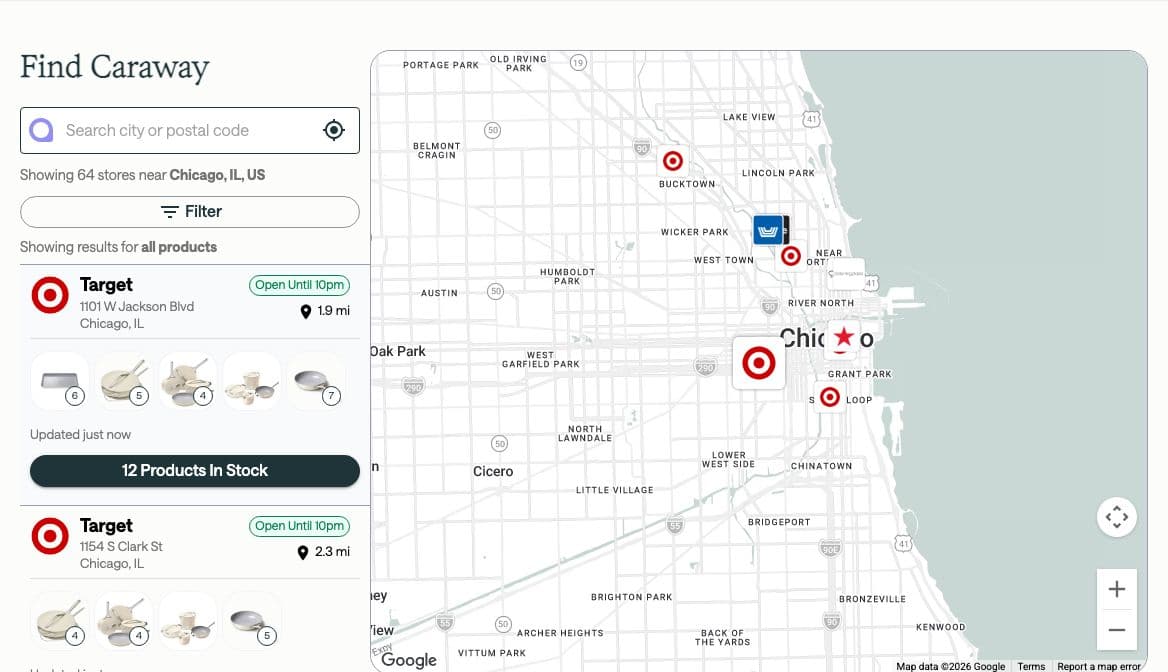
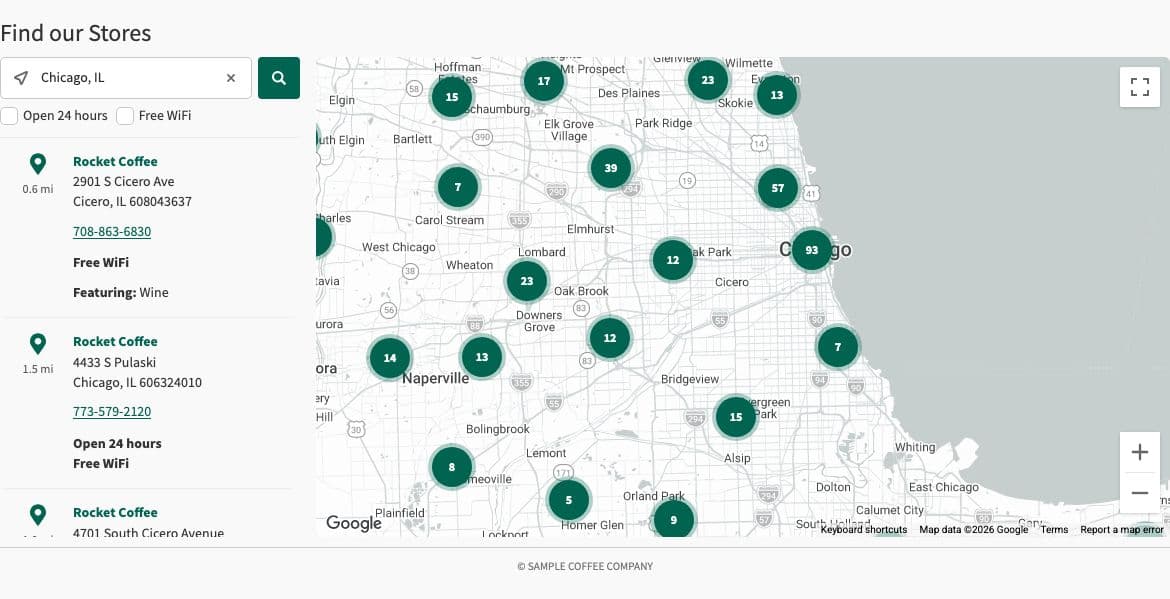
Both store locators as a shopper sees them, captured the same way: a 1280 by 800 browser window placed in Chicago, searching for Chicago. A demo holds whatever sample data its vendor chose, so where that changes what the picture shows, the caption says so. Each shot is trimmed to a common shape here; select one to see all of it.

StoreLocatorsCaptured October 15, 2026 from a live customer site, searching “Chicago, IL”.
StockistCaptured October 15, 2026 from the vendor’s own demo, searching “Chicago, IL”.

Pricing, side by side

Both products publish their prices, which is unusual enough in this category to be worth saying. The comparison is straightforward and Stockist wins it on price by a wide margin.

The figure that does not appear on either price list is the map key. Stockist’s tiers exclude the Google or Mapbox cost; ours include it. On a low-traffic locator that is nothing, and on a busy one it is the difference between a fixed bill and a variable one.

StoreLocators

Prices published

Three tiers on our Shopify App Store listing, scaling by retail locations: Launch up to 2,000 locations, Grow from 2,000 to 10,000, and Scale above 10,000, at $195, $395 and $995 per month.

  • Month to month, no long-term contract and no termination fee
  • Refund available within 30 days of the latest charge
  • Map included; shopper sessions and map loads are not metered

Free trial documented. A 14-day free trial on every tier.

Sources,

Stockist

Prices published

Three published tiers by location cap: Basic at $10 a month for 100 locations, Plus at $20 for 500, and Premium at $40 for 2,000. Paid annually those become $8, $16 and $32 a month, billed as $96, $192 and $384 a year. Above 2,000 locations pricing is quote-only, and the page says they can support up to 100,000 stores per map.

  • No free plan; a 14-day trial instead
  • Month to month or annual, cancel at any time, refunds within 30 days
  • Google Maps or Mapbox key supplied and paid for by the customer
  • Display languages capped by tier: 1, 2 and 4
  • Vendor reserves the right to terminate or deny service at any time, for any reason

Free trial documented. 14 days, described on the sign-up page as "free for 14 days".

Sources,,

StoreLocators vs Stockist at a glance

Sixteen rows on one review date. Where Stockist publishes nothing, the cell says so rather than guessing.

Source 1Stockist: homepage and pricingstockist.co. Reviewed 2026-10-15.Full citationSource 2Stockist: sign-up and trialstockist.co. Reviewed 2026-10-15.Full citationSource 3Stockist: terms of servicestockist.co. Reviewed 2026-10-15.Full citationSource 4Stockist: privacy policystockist.co. Reviewed 2026-10-15.Full citationSource 5Stockist on the Shopify App StoreShopify App Store. Reviewed 2026-10-15.Full citationSource 6Stockist reviews on the Shopify App StoreShopify App Store. Reviewed 2026-10-15.Full citationSource 7Stockist help centrehelp.stockist.co. Reviewed 2026-10-15.Full citationSource 8Stockist docs: installing the store locatorhelp.stockist.co. Reviewed 2026-10-15.Full citationSource 9Stockist docs: installing on Shopifyhelp.stockist.co. Reviewed 2026-10-15.Full citationSource 10Stockist docs: using custom fieldshelp.stockist.co. Reviewed 2026-10-15.Full citationSource 11Stockist docs: linking to a Google Sheethelp.stockist.co. Reviewed 2026-10-15.Full citationSource 12Stockist docs: formatting store addresseshelp.stockist.co. Reviewed 2026-10-15.Full citationSource 13Stockist docs: options for high-usage clientshelp.stockist.co. Reviewed 2026-10-15.Full citationSource 14Stockist docs: setting up multiple languageshelp.stockist.co. Reviewed 2026-10-15.Full citationSource 15StoreLocators: guarantee, refunds and cancellationstorelocators.com. Reviewed 2026-10-15.Open the sourceFull citationSource 16StoreLocators on the Shopify App StoreShopify App Store. Reviewed 2026-10-15.Open the sourceFull citationSource 17StoreLocators: free retailer store listsstorelocators.com. Reviewed 2026-10-15.Open the sourceFull citation
StoreLocators vs Stockist at a glance
FeatureStoreLocatorsStockist
Pricing and proof
Contract termsMonth to month, cancel any timeStoreLocators: Contract termsNo long-term contract and no termination fee. Refunds within 30 days of the latest charge.Source15. StoreLocators: guarantee, refunds and cancellationMonth to month or annual, cancel any timeStockist: Contract termsAnnual is billed at a discount. Refunds within 30 days of a payment. Their terms also reserve the right to terminate or deny service at any time, for any reason.Source3. Stockist: terms of service
Pricing$195–$995 per monthStoreLocators: PricingThree tiers on our Shopify App Store listing, scaling by retail locations: Launch up to 2,000, Grow from 2,000 to 10,000, Scale above 10,000.Source16. StoreLocators on the Shopify App Store$10–$40 per monthStockist: PricingAnnual equivalents $8, $16 and $32 a month, billed as $96, $192 and $384 a year. A quote-only tier sits above them.Source1. Stockist: homepage and pricing
Merchant ratingSame storefront, so these compare. Read with the count.5.0StoreLocators: Merchant rating5.0 from 17 reviews on Shopify App Store.Source16. StoreLocators on the Shopify App Store5.0Stockist: Merchant rating5.0 from 351 reviews on Shopify App Store.One of the strongest public records in this comparison set, and a large enough sample to mean something: 349 five-star, one four-star, one one-star. Shopify is the only rating shown here. We could not confirm a G2 rating, so none is shown.Sources5. Stockist on the Shopify App Store6. Stockist reviews on the Shopify App Store
Evaluate without a sales callYesFree trial, public app listingStoreLocators: Evaluate without a sales callSource16. StoreLocators on the Shopify App StoreYes14-day free trial, public app listingStockist: Evaluate without a sales callNo free plan. The trial is time-limited rather than a permanent free tier.Sources2. Stockist: sign-up and trial5. Stockist on the Shopify App Store
Retailer coverage
Adding a retailer you sell throughThe gap between the retailer list you are sold and the one you actually sell through.On request, typically within days, at no additional costYou add it yourselfStockist: Adding a retailer you sell throughThere is no discovery or crawl feature anywhere on the site, the Shopify listing, or the five help-centre categories. Finding out that a new retailer stocks you is your job; entering it is a row in a sheet.Source7. Stockist help centre
Retailer coverageCoverage only counts where you actually sell.205 retailers, 110,516 locationsStoreLocators: Retailer coverageSource17. StoreLocators: free retailer store listsNot published by the vendorStockist: Retailer coverageNo retailer network.Stockist publishes "store locators for thousands of brands, large and small", which counts its own customers rather than retailers or locations. It supplies no store data, so there is no coverage figure to publish.Source1. Stockist: homepage and pricing
Location capA cap you can grow past is a repricing event, not a feature.Priced by retail locations, not cappedStoreLocators: Location capPlans scale by location count rather than cutting the map off at a number.100, 500 or 2,000 by planStockist: Location capHard caps by tier. Above 2,000 the pricing page directs you to contact them, saying they can support up to 100,000 stores per map.Source1. Stockist: homepage and pricing
Data and freshness
Where the store data comes fromThe whole difference. Everything else follows.Automatic discovery across 205 integrated retailer feedsStoreLocators: Where the store data comes fromNo spreadsheet to maintain. Retailers that stock you are found in their own feeds and appear without you entering them.Locations you enter, import or sync from a sheetStockist: Where the store data comes fromThree routes, all starting from data you already hold: a form, a CSV or XLSX import, or a standing Google Sheets sync. The sheet sync is a live link rather than a one-off upload, so the refresh is automated even though the source is manual.Sources5. Stockist on the Shopify App Store11. Stockist docs: linking to a Google Sheet
Refresh cadenceA locator that sends a shopper to a store that dropped the line costs more trust than it wins.Retailer feeds, refreshed dailyDaily check of a linked Google Sheet, or on demandStockist: Refresh cadenceThere is no vendor-side data pipeline. A linked Google Sheet is checked once a day, with a Sync Now button for an immediate update, so the map is as current as the spreadsheet behind it. Stockist’s help centre lists the sheet link as a Premium feature.Source11. Stockist docs: linking to a Google Sheet
Product-level availabilityWhether the map answers "who has this product" or only "where are the shops".YesPer product, per variant, per store, filtered to in-stockStoreLocators: Product-level availabilityRetailer-reported rather than a live poll of a physical shelf, which is the honest description of what this category actually has.NoNot offeredStockist: Product-level availabilityStockist has no inventory concept. Its custom fields accept single-line text, multi-line text or a link and nothing else, so there is nowhere for stock to live. Filters exist but are generic ones the merchant defines.Source10. Stockist docs: using custom fields
Implementation
Install pathShopify app section, or a script tag anywhere elseStoreLocators: Install pathSource16. StoreLocators on the Shopify App StoreShopify app page, or a JavaScript snippet elsewhereStockist: Install pathOn Shopify the app adds a Store Locator page automatically, with an Online Store 2.0 theme template as the alternative. Off Shopify it is a copy-paste snippet, with guides for WordPress, Squarespace, Wix, Drupal and BigCommerce.Sources9. Stockist docs: installing on Shopify8. Stockist docs: installing the store locator
Developer requiredWhether this ships this week or waits for engineering time.NoNot requiredNoNot requiredStockist: Developer requiredThe recommended Shopify path is theme-independent and needs no code edit.Source9. Stockist docs: installing on Shopify
Time to launchUnder 5 minutes on ShopifyStoreLocators: Time to launchSource16. StoreLocators on the Shopify App StoreMinutes, per StockistStockist: Time to launchTheir own claim, and consistent with the documented install path.Source2. Stockist: sign-up and trial
Who pays for the mapA locator billed per map load has a second invoice attached to it, from Google or Mapbox rather than the vendor.YesIncludedStoreLocators: Who pays for the mapThe map is part of the subscription. There is no separate Google or Mapbox bill, and shopper sessions are not metered.NoYou supply and pay for itStockist: Who pays for the mapStockist requires your own Mapbox or Google Maps key. Its "unlimited traffic" means Stockist does not meter map loads, not that they are free: its own docs warn that high-traffic sites reach Google’s free usage limits, and that charges past that point are the customer’s responsibility.Sources1. Stockist: homepage and pricing13. Stockist docs: options for high-usage clients
Features
Wholesale self-submissionIndependent stockists rarely appear in any feed. Letting them add themselves is the only way to catch them.YesSubmit Your Location blockNoNot offeredStockist: Wholesale self-submissionNo dealer or stockist self-submission form appears in the product or its documentation. New locations arrive only through you.Source7. Stockist help centre
Support
Support modelEvery message reaches Anthony La Corte, Customer Success & Onboarding Specialist at StoreLocatorsOur Customer Success & Onboarding SpecialistEmail, target of two business daysStockist: Support modelTheir terms commit to commercially reasonable efforts to respond within two business days. No chat or phone channel is published. Support is explicitly not gated by tier: it sits under "All plans include".Sources3. Stockist: terms of service1. Stockist: homepage and pricing

Stockist in its own words

“Add a store locator to your website in minutes.”

Stockist, sign-up page

“store locators for thousands of brands, large and small”

Stockist homepage

“the process of looking up geographical coordinates for each store so that we can show a pin in the right spot on the map”

Stockist help centre, on geocoding

Note what the "thousands of brands" figure counts. It is a customer count, not a store count: thousands of brands run a Stockist locator, each with their own locations in it. It is not a claim about retailer coverage, and Stockist does not make one, because Stockist does not supply store data. Every location in a Stockist map was put there by the brand that owns the map.

The setup claim is fair and matches what the docs describe. On Shopify the app adds a Store Locator page for you, with an Online Store 2.0 theme template as the alternative when you want control over the layout. Everywhere else it is a copy-paste JavaScript snippet.,,

Where StoreLocators is different

The store list is the product, not the input

Stockist maps what you give it. We find it. Retailers that stock you are discovered across 205 integrated retailer feeds and appear without anyone typing them, which matters most for exactly the retailers a brand tends to miss: the ones a distributor placed you into.

Product-level availability, not just an address

Our map answers which nearby store has a specific product, refreshed daily from retailer feeds. Stockist has no inventory concept at all, and its own field types prove it: text, multi-line text, and link. This is the single largest difference between the two products and it is not a matter of degree.

One bill, including the map

The map is inside our subscription and shopper sessions are not metered. With Stockist the map is your own Google or Mapbox key, and their documentation is candid that a high-traffic locator will reach Google’s free quota and start costing you money that Stockist never sees.

Independents can add themselves

Small stockists rarely appear in any retailer feed, ours included. Our Submit Your Location block lets a shop add itself for approval, which is the only reliable way to catch the long tail. With Stockist every location arrives through you.

Every row where the table above separates us

Taken from that table rather than written out again, so the two cannot disagree. A row shows up here when we publish an answer and they publish none, or when both answer and ours covers more of the feature. Rows where both sides publish a figure, a price or a rating, stay out: those differ by their content.

Retailer coverage
StoreLocators: 205 retailers, 110,516 locationsStockist: No retailer network
Product-level availability
StoreLocators: Per product, per variant, per store, filtered to in-stockStockist: Not offered
Who pays for the map
StoreLocators: IncludedStockist: You supply and pay for it
Wholesale self-submission
StoreLocators: Submit Your Location blockStockist: Not offered

The real question: who maintains the list

Every difference between these two products reduces to one question, and it is worth answering honestly before looking at price. Do you own your store list, or does it belong to retailers you sell through?

If you own it, Stockist is excellent and we are overkill. A retailer with 60 of its own shops has an accurate list already, and the job is to put it on a map. Stockist does that for $10 a month, in minutes, with a support record most vendors would envy.,

If retailers own it, the spreadsheet is the problem rather than the solution. A brand in 3,000 grocery doors does not know which 3,000, the set changes every month, and nobody tells the brand when a chain drops the line or a new region picks it up. Maintaining that by hand is a standing job, and the map is wrong between the times someone does it.

Who pays for the map

Stockist advertises unlimited traffic, and the phrase is true in the narrow sense that Stockist does not meter map loads. The map itself runs on your own Google Maps or Mapbox key, which you obtain and pay for.

To their credit their own documentation says this plainly rather than burying it: high-traffic sites may find their locator receives enough visits to reach Google’s free usage limits, and charges past that point are the customer’s responsibility. That is a second, variable invoice attached to a fixed-price product, and it arrives from Google rather than from Stockist.

Our map is part of the subscription and shopper sessions are not metered, so the price you see is the price. Below Google’s free tier the difference is nothing, which is most sites. It matters at the point where a locator starts working.

A published conflict worth knowing about

Stockist’s own pricing page and its Shopify App Store listing disagree about what the cheaper plans include, and the disagreement was confirmed on both pages on the same day.

On stockist.co every plan card repeats an identical feature list, including Google Sheets sync and removal of the powered-by link, and closes with "All other features included". The Shopify listing gates Google Sheets sync and the powered-by removal to Premium at $40, and gates map theme colours, heatmaps and search export to Plus.,

Stockist’s own help centre article on Google Sheets sync says the feature is available on the Premium plan and higher, which matches the Shopify listing. If Google Sheets sync or white-labelling is the reason you are buying, confirm which tier carries it with Stockist before you subscribe rather than relying on the plan cards alone.

Store hours, and what a text field cannot do

Stockist has no structured field for opening hours. Hours are entered as free text in a generic custom field, which the docs give as an example use alongside a fax number and a Facebook page.

That is fine on a page a human reads. It is not fine for anything that has to reason about the hours: an "open now" filter, sorting by what is open, or structured data a search engine can use. Free text cannot be queried, and the three available field types are single-line text, multi-line text and link.

Both of these are easy to get wrong from the marketing pages alone. Stockist does handle hours and does geocode addresses automatically. The limitation is the shape of the hours field, not their absence.

Moving from Stockist to StoreLocators

The move is unusually simple in this direction, because your Stockist data is already in a format built for export: a spreadsheet, or a Google Sheet you control.

The point of the move is that the spreadsheet stops being the source. Your own locations stay yours to manage; retailer locations come from the feeds instead, so the rows that used to go stale are no longer rows you maintain.

  1. Export what you haveTake the CSV or the Google Sheet behind your Stockist map. Every location, plus whatever you kept in custom fields, comes across in one file.Minutes
  2. Split owned locations from retailer locationsYour own shops and any independents you track by hand stay as managed locations. Chain retail locations do not need to come across at all: they arrive from the retailer feeds, current, and stop being your responsibility.An hour or so, once
  3. Turn on the retailers you sell throughPick your retailers from the integrated list. Anything missing is added on request, typically within days, at no extra cost.Minutes, plus our turnaround for anything new
  4. Install and cut overAdd the app section on Shopify, or a script and a div anywhere else, then point your existing locator URL at the new page so no link or ranking is lost.Under 5 minutes on Shopify
  5. Retire the Google Maps keyOnce the Stockist embed is gone, the map key it required is no longer serving your locator. Check your Google Cloud billing and remove or restrict the key so it cannot accrue charges.Minutes

Frequently asked questions

How much does Stockist cost?

Stockist publishes three tiers by location cap: Basic at $10 a month for up to 100 locations, Plus at $20 for 500, and Premium at $40 for 2,000. Paid annually those drop to the equivalent of $8, $16 and $32 a month, billed as $96, $192 and $384 a year. There is no free plan, but there is a 14-day trial. Above 2,000 locations pricing is quote-only, and the pricing page says they can support up to 100,000 stores per map. One cost is not in those figures: you supply and pay for your own Google Maps or Mapbox key.,,

Does Stockist show product availability or stock?

No. Stockist has no inventory concept. Its custom fields accept only single-line text, multi-line text or a link, so there is nowhere for stock data to live, and no feature anywhere in the product or its documentation reports store-level availability. It has search filters, but they are generic ones the merchant defines rather than a stock signal. If a shopper needs to know which nearby store has a particular product, that is the capability line between Stockist and a where-to-buy platform.

Does Stockist find retailers that stock my product?

No, and it does not claim to. There is no discovery or crawl feature on the homepage, the Shopify listing, or any of the five help-centre categories. Every location in a Stockist map is one you entered, imported or synced from a sheet you maintain. Its "thousands of brands" figure counts Stockist customers, not retailers or store locations.,

Is Stockist good?

On the Shopify App Store it holds 5.0 stars across 351 reviews, distributed as 349 five-star, one four-star and one one-star. Reviewers name ease of setup, reliability and support responsiveness. The one-star review objects to the price for what it calls a simple Google Map integration. We could not confirm a G2 rating, so none is shown. No Capterra or Trustpilot rating is shown either.,

What is Stockist support like?

Email, and the same on every plan rather than gated by tier. The terms commit to commercially reasonable efforts to respond within two business days. No phone line or live chat is offered, and the terms are explicit that access is not warranted to be uninterrupted.

What is the best Stockist alternative?

It depends on why you are leaving. If Stockist is too expensive or you want a free tier, this is not the page for that and the answer is another widget in the same class. If you are leaving because maintaining the store list has become a job, or because shoppers want product-level availability, that is the gap StoreLocators fills: retailer feeds instead of a spreadsheet, per-product and per-store availability refreshed daily, and the map cost inside the subscription. It costs about twenty times more, which is the honest headline.

Other comparisons

How we researched this

Researched and written by Anthony La Corte.

Last reviewed

Every Stockist claim on this page was taken from stockist.co, its help centre at help.stockist.co, its terms and privacy pages, or its Shopify App Store listing and review pages, and each was checked on 15 October 2026. The sources are listed below with the exact URL we read.,,

Every claim was checked twice against the vendor's own pages before publishing.,

Some things are deliberately absent rather than estimated. We could not confirm a G2 rating, so none is shown. No Capterra or Trustpilot rating is shown either. Founding date, headcount and ownership are not published by Stockist and are not guessed at. Claims about StoreLocators come from our own public pages and are not separately cited.

Sources

17 sources

Every claim on this page cites the source it came from, with the date we checked it. Sources are named but not linked; search for the title to find the page.

  1. 1.Stockist: homepage and pricing stockist.co. Reviewed 2026-10-15.“store locators for thousands of brands, large and small”Source for all three published tiers and their caps: $10/$8 for 100 locations, $20/$16 for 500, $40/$32 for 2,000, billed annually as $96, $192 and $384. Also carries "Need higher limits? We can support up to 100,000 stores per map - please get in touch for more details." Every plan card repeats an identical feature list and closes with "All other features included", which is what conflicts with the Shopify listing. "Unlimited traffic" appears here, qualified by "using your own Mapbox or Google Maps key". Support appears under "All plans include:".
  2. 2.Stockist: sign-up and trial stockist.co. Reviewed 2026-10-15.“Add a store locator to your website in minutes.”Also states "Stockist is free for 14 days." No free plan is offered here.
  3. 3.Stockist: terms of service stockist.co. Reviewed 2026-10-15.“We do not warrant that your access to the service will be uninterrupted.”Also the source for the support commitment ("commercially reasonable efforts to respond to all inquiries within two business days"), the refund window ("within 30 days from the date the transaction was made"), cancellation at any time, and the vendor’s right to "terminate or deny your use of the service at any time, for any reason".
  4. 4.Stockist: privacy policy stockist.co. Reviewed 2026-10-15.“Stockist serves the role of a data processor for personal visitor data because we do not own, control, or direct the use of such data collected by our clients.”The words GDPR, CCPA, SOC 2 and subprocessor do not appear in this policy. What it contains is the processor-role statement quoted here and an international-transfer disclosure. Data retention is not addressed.
  5. 5.Stockist on the Shopify App Store Shopify App Store. Reviewed 2026-10-15.“Manage store listings one-by-one, import a spreadsheet, or sync a Google Sheet”Shows 5.0 stars from 351 reviews. The Built for Shopify badge does not appear on this listing. Lists the tier gating that conflicts with the vendor pricing page: Google Sheets sync and "No powered-by link" under Premium, map theme colours, heatmaps and search export under Plus. Also the source for the Seattle HQ address and the 17 June 2016 launch date.
  6. 6.Stockist reviews on the Shopify App Store Shopify App Store. Reviewed 2026-10-15.351 reviews total on 2026-10-15, distributed 349 five-star, one four-star, one one-star. The single critical review reads "Way, way, way to pricey for what you get. This is a simple google map integration and they charge 40 dollar/month. Really not worth it." Reviewing merchants are named publicly on this page, among them Armstrong Garden Centers, Pocket’s Chocolates, IRIS, MWL Bride and Forge & Flame.
  7. 7.Stockist help centre help.stockist.co. Reviewed 2026-10-15.79 articles across five categories. Searched for discovery, API and SEO features: an "api" search returns 12 articles, mostly about Google Maps or Mapbox keys and none about a Stockist API; an "seo" search returns one unrelated article about renaming the locator page. No discovery or crawl feature appears in any category.
  8. 8.Stockist docs: installing the store locator help.stockist.co. Reviewed 2026-10-15.“To install your store locator on your website, you'll just need to copy and paste a small snippet into the source of one of your site's pages”Install guides exist for WordPress, Squarespace, Wix, Drupal and BigCommerce alongside Shopify.
  9. 9.Stockist docs: installing on Shopify help.stockist.co. Reviewed 2026-10-15.Documents two paths: the app "automatically add[s] a new Store Locator page", which is the recommended and theme-independent route, or installation into an Online Store 2.0 theme template for more control over layout.
  10. 10.Stockist docs: using custom fields help.stockist.co. Reviewed 2026-10-15.The only field types are Text (single-line), Text (multi-line) and Link. There is no inventory or stock concept. Store hours are given as an example use of a generic custom field, alongside a fax number and a Facebook page, so hours are free text rather than structured data.
  11. 11.Stockist docs: linking to a Google Sheet help.stockist.co. Reviewed 2026-10-15.The sheet link is a standing sync rather than a one-off import: "Stockist will check your sheet once a day for any changes", with a manual "Sync Now" option. The article also states "This feature is available on our Premium plan and higher."
  12. 12.Stockist docs: formatting store addresses help.stockist.co. Reviewed 2026-10-15.“the process of looking up geographical coordinates for each store so that we can show a pin in the right spot on the map”Confirms automatic geocoding from the store address. The spreadsheet import article (help.stockist.co/article/18-formatting-a-spreadsheet-for-import) also allows latitude and longitude columns to skip the lookup.
  13. 13.Stockist docs: options for high-usage clients help.stockist.co. Reviewed 2026-10-15.“clients with very high-traffic sites may find that their locator receives enough visits to reach Google's free usage limits”Also states that "charges incurred after that point will be your responsibility", which is what qualifies the "unlimited traffic" claim on the homepage.
  14. 14.Stockist docs: setting up multiple languages help.stockist.co. Reviewed 2026-10-15.“The number of languages that you can add depends on your plan level.”The docs confirm that display languages are gated by tier without naming the counts; the pricing page gives them as 1, 2 and 4.
  15. 15.StoreLocators: guarantee, refunds and cancellation storelocators.com. Reviewed 2026-10-15.“StoreLocators.com operates on a month-to-month subscription model with no long-term contracts or termination fees.”Also states that a subscription can be cancelled at any time through Account Settings under Billing, and that a refund may be requested within 30 days of the latest charge.
  16. 16.StoreLocators on the Shopify App Store Shopify App Store. Reviewed 2026-10-15.
  17. 17.StoreLocators: free retailer store lists storelocators.com. Reviewed 2026-10-15.Publishes 110,516 store locations across 205 retailers as free CSV downloads with addresses, phone numbers, opening hours and coordinates. The counts are taken from the live lists.
110,516+ locations connected

Every ClickDeserves aDestination

Connect your online shoppers to in-stock products at retail stores nearby. In five minutes. With zero maintenance.

94K+
Retail Doors
9%+
Order Lift
255%+
More Visits
View on Shopify